
DevSoft · CGAS Qt Manager
Technical Setup & Administration
A practical reference for laboratory administrators and IT support.
This page summarises the supplied installation guide and task-based manual for CGAS Qt Manager version 1.0.0. Confirm the packaged release documentation when planning an installation.
System components
| Layer | Function |
|---|---|
| Desktop application | Packaged CGAS application with a private Python/Qt runtime and matched plugins |
| MySQL database | Structured patient, assessment, graph, metadata, group and related records |
| Working folder | Managed C3Ds, configuration, exports and graph output |
| MySQL Workbench | Connection verification, inspection and database backup |
| Mokka, optional | C3D animation and metadata inspection through a configured external viewer |
Working-folder reference
| Item | Purpose |
|---|---|
Connection.ini |
Database connection settings, including the application database password; protect access to this file |
CGAS.ini |
Runtime and external-tool paths |
_C3D_FILESAxID |
Managed C3D storage organised by assessment ID |
_EXPORT_DATA |
Patient and assessment exports |
_EXPORT_GROUP |
Group exports |
_GRAPH_DATA |
Saved graph folders and render output |
Reference.ini, EMG.ini, EMG_Template.ini |
Initial reference and EMG configuration |
The installation guide recommends C:CGASCGAS_AppsCGAS_MotionConnect_DB for a test working folder. Use an approved persistent location rather than Downloads, a temporary folder or Program Files.
Import and display configuration
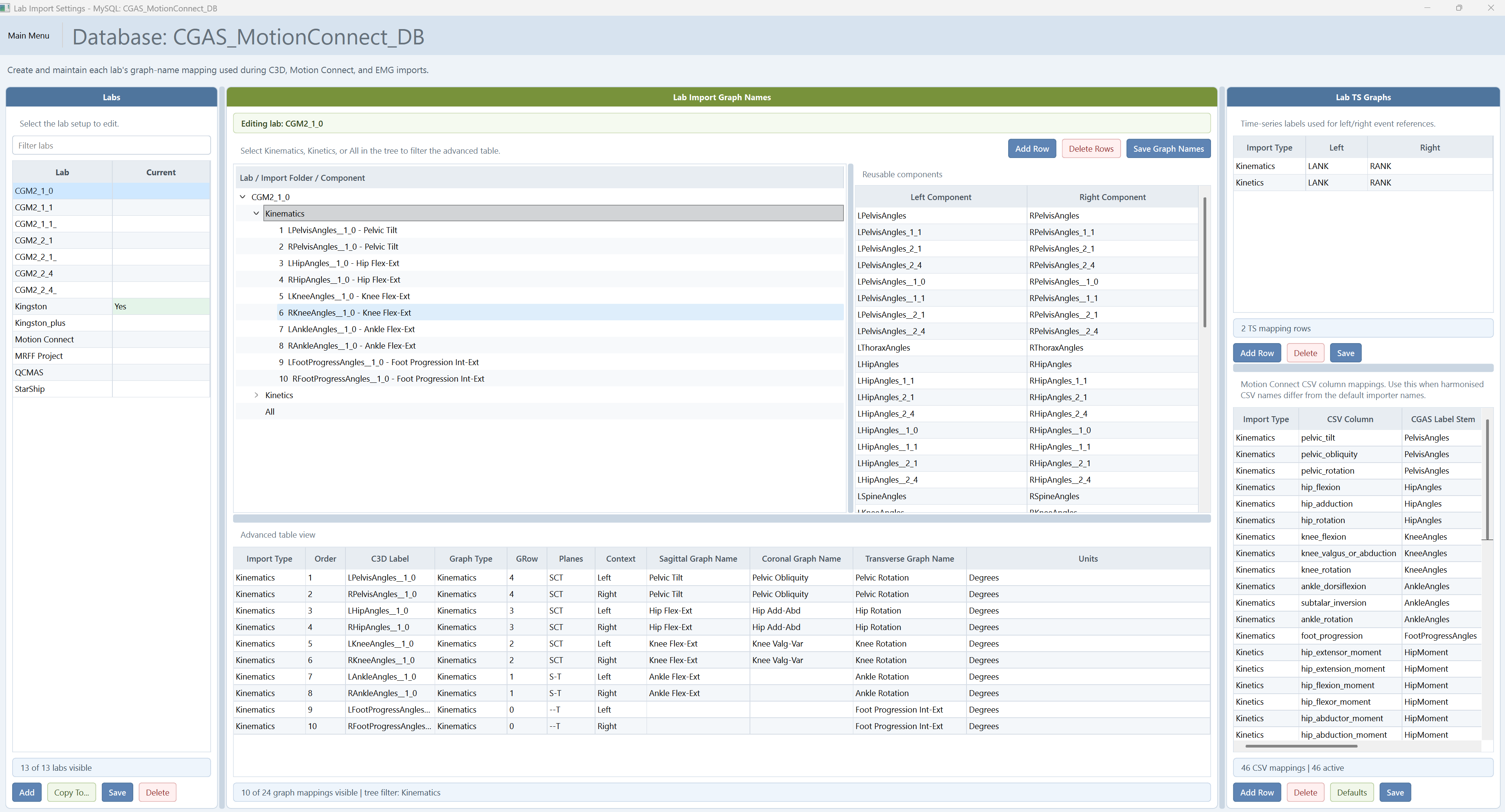
Lab Import Settings map external C3D labels to graph names, contexts, planes and units. Check exact label spelling, the lab model/marker set and ordering. Configure Motion Connect mappings separately where harmonised labels differ.
User Motion Graph Params control graph layout, visibility, presentation order and axis limits. A plot row of -1 excludes a graph. Verify the resulting layout through Plot Graphs.
Motion Connect folder contract
- Select the
c3d_parser_outputroot folder. - The
normalisedsubfolder suppliescombined_kinematics.csv,combined_kinetics.csvandspattemp.csv. - The
de_identifiedsubfolder contains matching companion C3Ds. - Run MC Validator before import; check missing files and trial-name matches.
- Use harmonised CSV values for graph data; companion C3Ds support storage, viewing and metadata.
Accounts and access
Keep MySQL setup administration, the CGAS database account and CGAS application accounts separate. Use named application accounts and assign the required roles, institutions/labs and permissions through Security Administration. Review audit logs when investigating administrative changes.
Use MySQL root only for approved database administration tasks. Store passwords in the approved password manager and keep Connection.ini out of shared documentation and email.
Storage maintenance and backup
Use C3D Storage Manager to scan, migrate legacy flat folders and verify managed copies. Clear legacy database storage only after confirming managed files and recovery backups.
Back up MySQL and the working folder together. Either one alone omits part of the system. Record the CGAS/MySQL versions, database, service, host/port, folder location and support contact in the installation register.
Troubleshooting reference
| Symptom | First checks |
|---|---|
| MySQL connection error 2003 | Service status, host/port, Workbench connection; ask IT to check remote-server access |
| Setup cannot find mysql.exe | Browse to the MySQL Server bin folder; mysqlsh.exe is a different program |
| Qt plugin or missing Argon2 error | Repair/reinstall the matched packaged application; avoid manually mixing runtime folders |
| Mokka will not open a trial | Viewer path, managed C3D existence and folder access |
| Missing graph output | Source cycles, events, lab mapping, rank range and Plot / Save before Render |
| Legacy Access cannot connect | ODBC/Access bitness and authentication compatibility; have the DBA assess it separately |
Legacy Access compatibility depends on schema, driver and server configuration. CGAS Qt Manager itself does not require ODBC.